Wednesday, April 01, 2009

GMail “inbox”

I do not know if anyone noticed or not, but with such a fan following, someone was bound to notice. From today morning, the GMail Inbox is being pronounced as “inbox” with a small “i”. Here is a pic:

smaill_i_gmail

I guess this has got to do something with today being the April Fool’s day. Google has a history of putting up weird things on this day for the last couple of years.

Sunday, March 15, 2009

GATE 2009 Rocked :-)

Today the GATE 2009 results have been announced. My results surpassed my expectations. After the examination on Feb 8th, I was more-or-less confident about getting into top 100. This confidence even withstood the discussions that I had with my friends at college who had also appeared in GATE. Lots of mistakes were discovered in the process. Eight of my 2-marks answers were wrong. Among the wrong ones around 3 were silly mistakes. The rest 5 were conceptual faults. Some of my wrong concepts stood corrected, which I guess is the long term benefit of the process.

Today morning was awesome, I was expecting a rank below 100 and secretly hoping it to be below 50. But the rank was better than all that at AIR 12, 99.97 %tile. I just could not believe it. It was Sukanto who gave me the good news at 09:58. We were all waiting for the results to go live at 10:00, but it was live at the IIT Kgp site shortly before that.

Future Plans

Now that GATE 2009 result has been very good I intend to go for higher studies in either IISc or a top IIT of the country in a M.Tech. or M.E. program. Will be applying for them as soon as possible. It feels great that I would be able to study under the best faculty that the country has to offer.

Wednesday, March 11, 2009

Poems on IT Recession

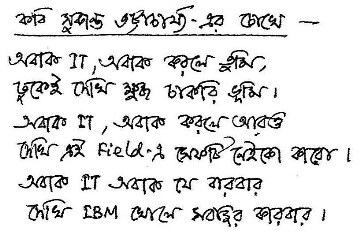
The recent global economic meltdown has caused the IT Industry in India to suffer a setback. The effect has cascaded to the students who were seeking job opportunities in the Information Technology related domains. Here are a few poems that our friends at IT industry have written along the lines of a few famous poets’ creations. The poems are in Bengali, and in JPG format.

Sukanto Bhattacharya

IT_recession_Sukanto

Rabindranath Tagore

IT_recession_Rabindranath

Nazrul Islam

IT_recession_Nazrul

Jibonando Das

IT_recession_Jibonando

Its good to see that even in these tough times, people have not lost their sense of humor.

Happy Holi

Happy Holi and Best Wishes to everybody.

holi

Tuesday, March 03, 2009

Using Firefox Profiles

As I mentioned in my last post, I have just reinstalled XP SP3 in my desktop machine. I was worried very much about having to reinstall Firefox in my new OS. I used the saved password feature to log-in to numerous sites. With the passing years of Firefox usage, right from version 1.0, I have picked up many good add-on. Then there is my library of bookmarks, which contains 1000+ links, all meticulously tagged, acquired through the years of browsing. I needed a way to transfer all these as seamlessly as possible to my new machine.

What I needed to transfer were (in order of importance):

  • Bookmarks
  • Saved passwords
  • Firefox Add-on
  • Auto-complete list
  • Browser History

Firefox Profile

very few people are aware of a feature called Firefox Profile, which is:

Firefox saves your personal information such as bookmarks, passwords, and user preferences in a set of files called your profile, which is stored in a separate location from the Firefox program files.

Profile contains the complete set of user information that Firefox uses. Any changes that we make in the program settings are also saved. The program updates, the search engines, toolbars, add-on, saved passwords, in short everything that you would like to export is all saved in profile. Another great thing about Profile is that it is inherently exportable. You do not need to be a geek to do all these.

Where is this Profile

The profile is located in a folder “xxxxxxxx.default”, where the xxxxxxxx string is generated by Firefox installer, and is random in nature. The folder can be found in location “%APPDATA%\Mozilla\Firefox\Profiles\”. Please note that the path given is for Win 2000 and Win XP. For other OS, please consult the official guide.

Backup & Restore

Backup the “xxxxxxxx.default” folder. To restore the data, go to the same location of a newly installed Firefox, and copy the contents of the old “xxxxxxxx.default” folder to the new “xxxxxxxx.default” folder. This should do the trick, now start Firefox and see the results yourself.

Cross OS

What is most interesting is that this procedure is cross OS compatible. I copied the contents of my Windows Firefox profile folder to the Fedora Firefox profile (I had to change one .ini file too), and it ran seamlessly.