Showing posts with label Microsoft. Show all posts

Wednesday, September 08, 2010

How to use Skydrive folders in Windows Explorer

I am a big fan of free online storage for my backups. So far Microsoft Skydrive seems to be the best one in terms of space. But the one thing which I hate about Skydrive is its incompatibility with any application. Ideally I would have liked to use the online folders as easily as my local folders. For example had the folder been openable in Explorer, then we could have used the “copy-paste” and “save in” features available for any local directory. Surely the latency would be higher, but at least there would be no need to do thing separately.

Anyways, here is a hack (not yet perfected but works so far) devised from various sources which allows anybody to mount his/her Skydrive folders in a local directory. This is formally called network mounting. The trick is simple enough for novice users too. Just follow the simple steps:

  1. Log-in to your sky-drive account from http://skydrive.live.com/
  2. Look into the address bar, you should see something like “https://cid-xxxxxxxxxxxxxxxx.skydrive.live.com/”, where the ‘x’s would be replaced by your unique customer-id. Copy the 16 characters of customer-id.
  3. Now open Notepad and do the following very carefully:
    1. and paste this 16 characters
    2. Note down the name of the folder that you would like to mount, say “MyOwn”
    3. In notepad create this URL (without quotes): “\\docs.live.net@SSL\xxxxxxxxxxxxxxxx\MyOwn”, replace the ‘x’s by your unique 16 character customer-id and replace “MyOwn” by the folder name (as it appears in Skydrive) that you want to mount.
    4. If you are trying to mount the default folders “Public” or “Documents”, then you have to use “^2Public” and “^2 Documents” in place of “MyOwn”.
    5. Now copy the final URL that you made.
  4. Open Explorer
  5. On the left side-bar, right click on “Network”, and select “Map network drive”
  6. Paste the URL you copied from Notepad.
  7. Select a drive letter, preferably something at the end of the English alphabet like “Z”, and hit the “Finish” button.
  8. You would be asked for your Windows Live-ID and password, which you must provide.
  9. Voila, you can now see the contents of that drive inside explorer by going to the drive you selected.
  10. Now you can use this folder just like any other local hard-drive folders. Open files from this drive by double clicking, save files, cut-copy-paste files to and from this directory.

Try it out, I’m sure you will stop using the online version after using this trick.

Now, a word of caution. This is NOT an official method, so Microsoft does not give you any guarantees of any kind for this method to work. So one fine morning this method might just give a lot of errors and rendered ineffective. But till then (and I believe chances of that happening is quite slim), utilize this feature.

Lastly the file size restriction still applies (50Mb per file). So unless you are felling adventurous, do not try this out with files lager than 50Mb. Sadly this thing does not work for non-Microsoft OS (Linux, to be specific). If I get something working on Linux, I will post it here.

If you have any questions/recommendations please post it here. I usually reply within a day.

Monday, May 04, 2009

Win 7 RC1 Review

I was awaiting the release of Win 7 RC1 for quite some time. As a Microsoft Student Partner, I have a MSDN Premium subscription. So as a soon as it was available in MSDN (30th April), I downloaded it.

Here are my observations for the last 2 days:

  • Win 7 continues to be FAST. I installed it on a AMD64 3000 with 1GB RAM and 6600GT ... worked great.

  • Minor tweaks in taskbar ... check out the "task bar thumbnail overflow" feature

  • Address Bar has been tweaked. In Win 7 Beta, if you browsed to a folder nested deep within the file structure the entire path could not be displayed and was truncated. In RC1, the parent folder and the current folder are always displayed.

  • Jumplists tweaked a bit

  • Search results are easier to view and understand. Snippets have been made longer and labeled up.

  • Start Up, Shut Down and Hibernate times have become smaller ... or is it because of a clean install?

  • AutoRun has been disabled by default in Flash drives

  • Windows Media Player's "Lightweight Playback Mode" has been rechristened to "Now Playing Mode" which takes us less resources.

  • UAC prompt now blacks out the desktop

  • Couple of Psychedelic wallpapers ... this is so un-Microsoft-ish ... but I liked the design work ... keep it coming

  • A friend reported some stuff about the battery meter in her laptop, but I’m not too sure about that

In summary. I see no new major feature. I was waiting for Win XP mode, but it was a disappointment not finding it in RC1. The new features are nothing but minor improvements from technical aspect, but it does beef up the usability of the OS. The improvements will enhance the UX and give a boost to the productivity.

In one line unless you are a UI geek, you would not see much improvements in Win 7 RC1 from Win 7 Beta. But if you just want to try Win 7 out after Vista or XP, this is a worthwhile download.

Monday, March 02, 2009

Show Hidden Files in Win XP SP3

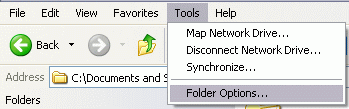
Yesterday I formatted my desktop computer and installed Win XP SP3. There was this strange problem of not being able to see the hidden files in Explorer. By default, users are not not supposed to be seeing hidden files. So the standard way is to go to the “Tools > Folder Options” in Explorer.

folder_options

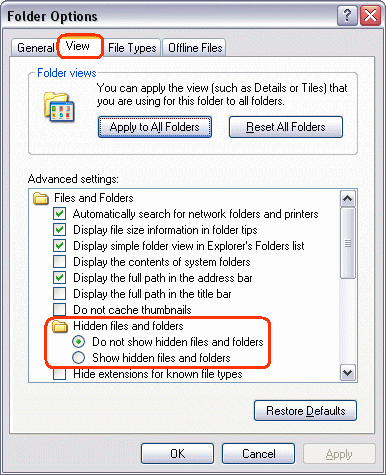
Then browse to the “View” tab, in the window.

view_tab

Select the radio button corresponding to “Show hidden files and folders”. Then apply this setting.Close all the explorer windows and then open one Explorer window to check the effect of the new setting.

However in my case, the setting did not have any effect what so ever. I repeatedly followed the above steps but somehow it did not seem to work. Maybe its due to some program conflicts, or maybe due to SP3. I did not face this problem in my older SP2 installations even after installing SP3 on top of SP2.

Thankfully, this has a workaround by tweaking the registry. From the “Start” menu, select “Run” option,

run_option

Then type “regedit” (without quotes) and press enter.

run_regedit

You should now see something like,

regedit_main

Then browse to
“HKEY_CURRENT_USER\Software\Microsoft\Windows\CurrentVersion\Explorer\Advanced”.

regedit_hidden_old

In the right hand area, double click on “Hidden”. And change the value to 1.

regedit_hidden_change

The final regedit window should look like,

regedit_hidden

Now close the all the explorer windows. Log off and log in. You should see the effects of your registry change. The hidden files will be shown in the explorer.

Thursday, October 02, 2008

MS Ads with Jerry Seinfeld

Here are two Microsoft Advertisements that featured American comedian Jerry Seinfeld, whom Microsoft hired and caused a lot of speculation. However, he has been recently axed from the campaign, leaving everybody wondering, what the Microsoft Advertisements guys are really upto.


I personally both of them, specially the way that they are showing Gates.

Friday, September 12, 2008

Microsoft Student Partner Lead

I got this email on Thursday, September 11th from Microsoft stating that I have been made the new Microsoft Student Partner (MSP) Lead from Kolkata. I am proud to receive this honour. Along with me, 5 others MSPs also got selected for MSP Leads:

  1. Kaushal Bhavsar (Ahmedabad)

  2. Lakshman Srikant (Bangalore)

  3. Mayur Tendulkar (Pune)

  4. Raveesh Maaya (Bangalore)

  5. Urjit Singh Bhatia (Baroda)

I do not know what is it, that I exactly did to be a MSP Lead, but I will surely try my best to live up to it. Thank you MS Academic India team :)

The other good news in the mail:

  • A new monthly newsletter have been introduced from this month.
  • The credit point system for the MSPs have also been improved with the introduction of new monthly awards.
  • From now on, the MSP selection procedure will have a formal written examination.

Sunday, June 15, 2008

Microsoft 2008 Launch Session at Kolkata

Today, KolkataNet arranged a launch event for the three newest products from Microsoft:

  1. Visual Studio 2008
  2. Windows Server 2008
  3. SQL Server 2008

The product launch took place at the Nicco Park Administrative Building and started from 10:30 AM. Heavy rainfall resulted in a poor turnout for the registered developers, but the attending crowd was in high spirits. Everybody was enthusiastic about the event.

SQL Server 2008

Jadeja Dushyantsinh Anopsinh from Microsoft started the session with a session on SQL Server 2008. He talked about the features that we can expect in the yet unreleased version of SQL Server, supposed to release later this year. The different new data type to be introduced in SQL Server 2008 were discussed.  The key management features along with various other security features were discussed. Out of the box support for a variety of new technologies would ensure that SQL Server goes a long way towards gaining the topmost spot for Databases used in the Industry.

Windows Server 2008

Sourav Basu delivered the next session with Windows Server 2008. The new HyperV was a big point for discussion. The difference between HyperV and Virtual PC also occupied a large part of the discussion. Various encryption and security features of Windows Server 2008 were also discussed. Forefront, the newest technology from Microsoft was also introduced. Bit Locker and NAP occupied a part of the talk too.

Visual Studio 2008

The last session of the day, on Visual Studio 2008 was delivered by Microsoft MVP, Abu Ismail. The session started with a discussion on the generations and evolution of Visual Studio from version 6 to 2008. Designer-developer conflict was discussed and XAML was introduced as a possible solution. A brief discussion followed on the newest features of C# 3.0 part of which was delivered by Jadeja. The get, set techniques was discussed, followed by extension methods. Inevitably, some discussion on the much talked about LINQ, followed. All the features were demonstrated in VS 2008.

Throughout all the three sessions, the audience participation was quite encouraging. The thoughtful exchanges by the industry professionals proved to be quite a learning experience for all of us. I am sure this will continue in the future sessions as well.

At the end ...

The session came to an end with TShirts being distributed to the most active participants. Jadeja thanked all the organizers: Abu Ismail, Sourav Basu, Arijit Basu and Robin Roy with token gifts.

The Best Part

But in my opinion, the most fruitful thing that came out of todays session was the planning ahead of many further sessions by KolkataNet. Ropbin Roy, COO Digital Avenue promised to arrange for a premise to hold the monthly sessions of KolkataNet. Topics of 6 next sessions were discussed and finalized with everybodys approval. Apart from the usual speakers, we will also get to see some new faces from the industry, who I'm sure will be a great addition to KolkataNet. A list of the sessions and a poll for deciding the day-of-week will soon be put up in this forum, so stay tuned.

As for my part, I have my Exams from 1st of July, so I will not be able to attend the next session, scheduled for 1st week of July on LINQ by Abu and Jadeja. :(

Conclusion

In conclusion, I guess we can say that June 15th 2008 was a significant day in the history of KolkataNet and TechBengal. I hope we see many such interesting sessions from this UG in future. The participation level and the number of new faces were really encouraging. As a student and a future developer, KolkataNet is proving to be a great source of knowledge for me.

Saturday, May 10, 2008

.NET Hands-On lab, 9th May 2008

Yesterday, I conducted a .NET Hands-On lab session in the Rajabazar Campus of University of Calcutta. Students from B.Tech. year 1, attended the session. Here are some of the pictures :

The session started at 1430 with an introduction to C#, followed by Hands-on session on Visual C# 2005 Express Edition. Starting from a basic Hello World application, we moved on to DateTime and TimeSpan classes and their usages. Basic IO operations were demonstrated, laying the groundwork for further sessions.

The session was quite a success, with almost all the student of B.Tech. I attending it. Unlike my last session, this session seemed to be very interactive. Lots of question were asked, and I tried my best to answer them. Its very encouraging to see, such a high level of participation from this group.

As I promised in the session, all the materials have been made available online. Please go to http://drop.io/MS_Club_CU, and download the materials. Please note that the site requires you to log-in. So use the password that I provided you last day.

Thanks to everyone who attended this session and made it a success. Please put in some feedbacks of the session and any suggestions of improvement.

Thursday, May 01, 2008

Virtual Tech Days resources available

Recently in an innovative way to launch their 2008 suite of products Microsoft organized a two days online session called Virtual Tech Days all across India on 9th and 10th of April. The seats were quite limited, and many could not register for the same owing to the closure of the registrations around 2 days before the event. However, now MS has made all the resources for the session (presentations and live recordings) available for everybody at  http://www.microsoft.com/india/virtualtechdays/. So even if you have missed the sessions, you can download them now and view them as and when you wish.

Most of the stuff is introductory in nature and can be a good place to start if you are totally new to this suite of products. However one can be most benefited, if they have a prior experience of working with previous versions of some of the products.

Friday, April 25, 2008

Microsoft video goof ups

I am a fan of Microsoft and follow them closely. I am a member of lot of their websites, like Channel 8, Channel 9, Connect ... to name a few. Recently I saw a couple of goof ups in their videos. Here I am going to post a couple of them.

Virtual Tech Days

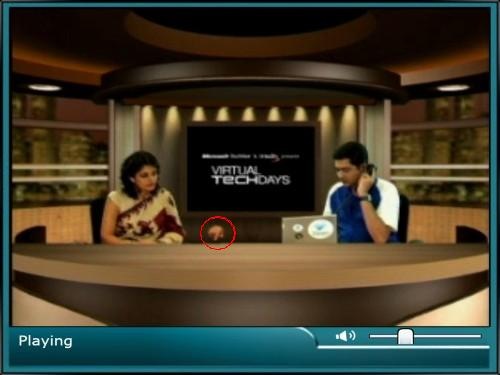
The first one is from Microsoft Virtual Techdays, an online event for the 2008 suite of products launch and videos. The whole thing was organized on 9th and 10th of April. Mandira Bedi and Pandu (I don't know his real name) was hosting the show and here is what happened when they actually tried to call up somebody. Look closely at the red circle with Pandu's hand as he dials a number.

Pandu

Most probably the seating arrangement was both the hosts sitting together side by side with the laptop between them against a uniform background. Later the images of two were split up and set aside. That is why Mandira was appearing to look at the table, when in effect she should have looked at the laptop. But at least we can over look this one as it was a live video (almost live in my opinion).

Jon Udell talks with Ray Ozzie

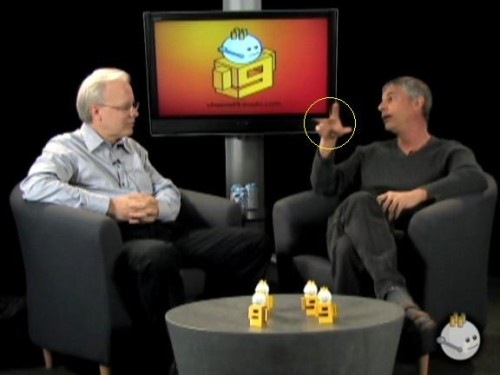
In a recent post in Channel 9, Ray Ozzie Introducing Live Mesh, the CSA from Microsoft introduced their new service "Live Mesh" to the world.

Ray Ozzie Video

The Channel 9 logo that was featured at the background LCD screen was superimposed later, as evident from the picture (yellow circle) where Udell's hands appear to be in front of the LCD but behind the picture !!

Guess MS video guys still need to give a better finishing touch on those videos. ;)

Tuesday, April 08, 2008

DreamSpark, Free MS Software for Students

I know that this is really late to talk about this Microsoft DreamSpark program. It was officially launched by Bill Gates quite a while back at the end of Feb '08. It is a program through which students around the world get access to Microsoft's professional-level developer and design tools at no charge.

This will give students a breakthrough in technology. Moreover, being able to use a professional tool is always an advantage to budding developers. By providing these tools free, MS is giving students a never before heard of opportunity to be exposed to exactly the same tool set that professionals use.

It is worthwhile to mention that MS has been giving away free tools to students for quite sometime now. They have various programs under which this is done.

  1. Express editions of Visual Studio compilers and IDEs have proved indispensable for hobbyists, casual developers and students. It is a great way to get introduced to the development platform provided by Microsoft.

  2. MSDN Academic Alliance is yet another program which gives an institution to distribute the entire line of MS products (barring just a handful) to all its pupils and use it for academic purposes.The students are encouraged to even install it in their home PCs.

  3. Participants of this year's Imagine Cup have also got free download access to professional editions of Visual Studio, Source Safe, Vista Business Edition and some more softwares at absolutely no cost.

However the DreamSpark program is still in a nascent stage and it is initially only being offered to students from US, UK, Canada, China and a couple of European countries. It is supposed to be implemented in stages and I am sure we will soon see India on that list.

Wednesday, April 02, 2008

Silverlight Presentation in Dev-Con

On Saturday, March 29th 2008, Heritage Engineering College in Kolkata organized a developer conference (Dev-Con) as a part of their annual Tech Fest "Daksh". A presentation on Silverlight was delivered by Mr. Deepak Jagdish, who happens to be a Program Manager for the Microsoft Student Partner project at Microsoft India. The session started at 10:30 and drew a crowd of 250+ students from all over the city.

Deepak Jagdish delivering session on Silverlight

After the initial formalities, Deepak started the session. he began talking about the basic concept of UX (user experience) and what is its relevance in today's world. Then he moved on to the designers versus the developers perspectives. The absence of a common platform between developers and designers lead to an inferior UX and introduced XAML as a solution to this problem by Microsoft.

Next he introduced the entire Expression Suite of products : Blend, Design, Web and Media, and explained about each of their usages. Then he moved on to Silverlight and its capabilities. How it is a cross-platform solution and mentioned the flexibility to code in any of the .NET supported languages for creating a Silverlight website.   Finally he demonstrated the Silverlight technology by showing a sample website with embedded video powered by Silverlight. He took the audience through the steps for creating a such demo website in the Expression Blend Feb 2008 demo edition.

Audience gathering at DevCon

Deepak also happened to be a two times national champion of the Imagine Cup Software Development event organized by Microsoft. However, he is not competing this year and in fact is on the other side of the Imagine Cup team. he is conducting the interviews and other stuff for the participants of this year.

Monday, March 24, 2008

Get back some free space after installing Vista SP1

When we install SP1, the installer keeps copies of the older versions of files it is replacing. This is done just in case the user wants to roll-back to the  original Vista, without SP1. However if you are satisfied with the machine after installation of SP1 (like its running for a couple of weeks without any glitches), then its safe to assume that you will never want to uninstall SP1. So you can delete these unnecessary set of files and get back some free space.

Thankfully this feature is already provided with SP1 installer, so no need to delve deep into the file system or download third party tools. Just open the command prompt and run vsp1cln.exe. It takes little time to execute.

Wednesday, March 19, 2008

IE 8 standard support

Currently, the Internet is abundant with articles, posts, debates (and flamings) about the standards support of IE8. The IE8 beta 1 which was released last week added more fuel to the fire. A lot of developers are concerned about it and a flurry of debates is livening up the scene.

Most of the stuff that we usually encounter on this topic can be classified into:

  1. Highly technical : For the set of hardcore developers and geeks only. Most of it does not make sense to outsiders.

  2. Technical : Like the ACID test. I do not know how many people totally understand it (I don't), but the basic idea is easy to grasp with pictures and all (and that is why the popularity).

  3. Hype, Criticism, and Flaming : IE Lovers Vs IE Bashers ... the usual age old battle.

However, today I encountered a totally different type of article which explains the whole standards thing from a different perspective, which apart from making a lot of sense is quite a good read. Very oddly titled Martian Headsets, the article compares the standards thing with a odd example. In spite of the lightweight and funny attitude, the author, Joel Spolsky, manages to explain the thing rather clearly and I got a clear idea of what was the main problem with the IE8.

Friday, March 14, 2008

My first session on .NET

Yesterday I delivered my first session on .NET as a Microsoft Student Partner (MSP). The session was held in the Sun Lab of Dept. of CSE in University Science College, Rajabazar. The topic was "Introduction to .NET". Around 30-40 pupils from our department attended the session along with a couple of members of faculty.

Initially I was feeling a bit tensed about having to give a public talk, but it all vanished as soon as I started interacting with the audience. The discussion was aimed at giving a good overview of .NET and demonstrate its features. The initial discussion about the features was a bit boring I guess, judging from the scarcity of response from audience. But it all livened up as soon as I began to show the Demo Applications. The audience began to ask a lot of questions and I did my best to give satisfactory answers.

The whole session went on for about one and half hours with lots of questions from the audience. The session came to an end with Prof. Sanjit Kr. Setua (SKS) announcing that our Department has subscribed to the MSDN Academic Alliance. This will allow all the students to use the entire suite of Microsoft softwares (except Office) for non commercial purposes both on Campus, as well as their home PCs.


Here are a couple of pictures of the session :


I have created a web based file sharing account for the MS_Club's use. There I will put up all the files associated with the MS Club of CU. The URL is : http://www.drop.io/MS_Club_CU/. The club members will be able to access all the files. To prevent unauthorized access, there is a password protection.

Saturday, February 02, 2008

VS 2008 Product Suite Comparison

I have been looking in the internet for a comparison of the suite for a long time. It will be great to show them in our Campus Club at the time of Visual Studio 2008 launch. Finally I found an official version from Microsoft only. Here's the link,

http://msdn2.microsoft.com/en-us/vstudio/products/cc149003.aspx

Personally I use the Professional Edition for my use. However, the Express Editions are very good for hobby programmers like me. Had I not got a subscription to the MSDN Premium, most probably I would have used it too.

The Team Suite and its cousins seem to be overkills for our small needs. Use them only for professional level stuff. Most of us do not need that sort of extensive features.

I would recommend the Express Editions for all those amongst us, who would like to try and build cool stuff using MS technologies. Its completely free and comes with its own version of MSDN, called the MSDN Express Edition. You can download it here along with the MSDN.

Friday, December 21, 2007

Project Hoshimi, Round 1, Rank 1

Project Hoshimi is a Programing Battle in Imagine Cup 2008. One has to programmatically control a set of nanobots to accomplish a set of given objectives. There are different types of bots, all controlled and synchronized by a single AI bot.

Round 1, the qualifying round for Hoshimi,  has started and I was participating on it for the last 3-4 days. Yesterday morning, I finally managed to optimize our strategy and managed to score 2700, which places us right at the top. Here is the leader board screen-shot :

Hoshimi_Round1

Our team CU_CSE is right at top with 8 other teams. Till now around 150 teams have taken part. I hope that 2700 is the maximum that we one can score in this round ... but let's see if somebody can beat that.

Imagine Cup 2008

What is Imagine Cup?

Like the last five years, this year too, Microsoft has organized the world’s premier student technology competition, Imagine Cup 2008 (IC_2008). Through Imagine Cup, Microsoft is encouraging young people to apply their technological skills, artistic abilities and creativity to make a difference in the technological world around us. This one of the largest global student events. Last year, in IC_2007, more than 100,000 students around the globe, took part in the competition.

This year too, IC_2008 has started. Anybody over the minimum age of 16 years and currently pursuing a educational course in any recognized school, college or university is eligible for participation.

Imagine Cup 2008 Events

IC08_Logo_small

This year's theme is : "Imagine a world where technology enables a sustainable environment". Based on this theme, students have nine different categories of competition each testing a pupils abilities in different categories :

The prize money are quite attractive and added to it is the exposure that students get. I am not sure about it, but most probably Microsoft offers job opportunities to the finalists. In any case, the competitions are too fun to miss. Most of them are online, so no need to move from the comforts of our home or maybe, just a few more hours at college. The charm of getting a team together and working along with a deadline in mind is just awesome.

Please participate ....

I urge all my fellow students to take part in this event. Do not worry about your skill level, you never know how your opponent is. The first time I tried my hands at a competition, I had no idea of others, but I slowly gathered confidence. The worst that can happen is that you lose, but even that offers a evaluation platform. At least one gets to know his/her position globally.

Microsoft Campus Unit Inauguration

On Dec 7th 2007, Friday, the Microsoft Campus Unit was inaugurated in the University College of Science and Technology (Rajabazar Science College) under the University of Calcutta. The venue was on the N.R.Sen Fluid Mechanics Hall. Many professors were present in the inauguration function :

  • Dr. D.D. Sinha (Head of the Dept, CSE)
  • Dr. S. Sen Sharma (Sr. Prof, CSE)
  • Mr. K.N. Dey (Sr. Prof, CSE)
  • Mr. S.K. Setua (Prof, CSE)
  • Dr. N. Chaki (Prof, CSE)
  • Dr. S. Chowdhury (Prof, CSE)

Mr. Mohammed Reza (Academic Advisor, Microsoft India) officially inaugurated the club and gave a talk on the functions and goals of the club. He discussed a lot about the opportunities and benefits that the students will get through this club. He answered many queries raised by the students on Microsoft.

The very informative two and half hour long session came to an end with Mr. Reza distributing five DVDs of Microsoft Visual Studio 2008 Team Suite (Beta 2) to five lucky draw winners.

More than 150 students attended the inauguration and were signed up for the Microsoft Campus Unit. A group called KolkataNetStudent has been created for this purpose and all interested students are requested to join it.

Monday, December 17, 2007

Microsoft Download Center Beta

While trying to download .NET 3.5 Power Toys, I suddenly had a very obtrusive pop up window thrown at my face, saying that I had been "randomly chosen" to experience the Beta version of Microsoft Download Center. I accepted the offer immediately and was soon taken to a page that checked whether my browser would support all the features of this preview. I keep my browser updated, and had the Silverlight plugin installed so I passed the tests easily. Below is the screen-shot of this test page ...

MS 02

The ball in the mid-right part of the page is a visual treat, rendered with silverlight. You got to see to believe the capabilities of Silverlight, but my CPU usage shoots up to around 30% for this alone.

Upon hitting the continue button, I was taken to the actual Beta page, which looked great but took a lot of time to load. Around a minute only to load the page. I am sure this would not be there in the final version. Here is the screen-shot of the beta page ...

Microsoft Download Center

The top banner displaying IE 7, is actually a slide show with 3 different pictures. I am sure, there are some other improvements too, but visually it is a treat to watch. Of course there are a few glitches, but I guess they would be taken care of in the release version.

Sunday, December 09, 2007

Visual Studio 2008 Express

Story so far ...

I tried to get into Win32 development for a long time, but I got my first experience with the Visual Studio 2005 Express editions. The most attractive part of the Express Editions was that they were free. Although advanced features were missing from it, I soon found out the tools provided were quite sufficient for my small requirements. I would rather jump into managed code development with a set of proper and legal tools rather than try out the same with the pirated versions where I had to always remain in fear. There was a version of MSDN for Express Editions too and it provided me with the much needed documentation.

So although I have become a Microsoft Student Partner now and enjoy a MSDN premium subscription that comes with it, the Express Editions still are very near to my heart. I distribute them to my friends and have a copy of it installed on a Virtual PC, in case I need to troubleshoot an application for my friend.

Visual Studio 2008 Express

The newest of the Express Editions is VS 2008 which sports a lot of improvements both in the Windows and the Web development areas. The WPF additions prove to be great. The WPF designer is like a boon for all those people interested in cool GUIs. It is very similar to the forms designer as per using it is concerned. Editing XAML and being able to see it instantly in the split view is cool too.

SQL Server Compact Edition is now a part of the C# and VB Express editions and allows us to create a data-driven application on the client side which can harness the power of SQL Server with much lower resource usage.

Multi targeting is another area that I love. You can target your code for older .NET platforms too, for running on PCs that do not have .NET 3.5 installed. I always use this feature when I do not need any new .NET 3.0 or 3.5 things link LINQ.

Web Developer Express 2008

The Web Developer Express 2008 has also improved. The Web page designer is been reworked. It now has a better support for CSS editing and development of AJAX based web sites is a breeze with it. I am told that it has improved its XHTML Standards compliance, but I am not competent enough to have a say in this regard. The javascript intellisense and debugging features were much needed which helps in writing complex javascript effects, menus and of course AJAX based sites.

... and this is what I think

Installing VS 2008 Express Edition over VS 2005 Express is an easy task. Moreover you can continue using it along with VS 2005 too. I currently have both in my virtual PC. Although no major glitches have surfaced so far to shy away for VS 2008, I hold on to VS 2005 just to be on the safe side. You can download Visual Studio 2008 Express free from the official MS sites. There are five different web installs :

and one single Express Edition ISO downloadable for offline installation. I recommend the ISO as you can burn it for later and distribute it too.